FOR BUSINESSES ALREADY USING QUICKBOOKS ONLINE
Keep QuickBooks for accounting. Add loyalty without adding busywork.
Preferred Patron™ connects supported QuickBooks Online customer and transaction activity to a purpose-built loyalty platform, so eligible sales can drive points, rewards, tiers, digital stamp cards and retention without duplicate entry.
Your team continues using QuickBooks Online for the financial workflow it already knows. Preferred Patron™ turns customer activity into a loyalty experience designed to bring people back.
QuickBooks Online is a third-party product. Preferred Patron Loyalty, LLC is not representing an affiliation with or endorsement by QuickBooks Online. Product and company names are used to describe compatibility and integration functionality.
DIRECT ANSWER
What does the Preferred Patron QuickBooks Online integration do?
It connects QuickBooks Online customer and qualifying sales activity with Preferred Patron™. Customer records can be matched or created, supported transactions can be posted to loyalty, and later refunds or voids can be reflected without making staff maintain a separate manual transaction feed.
QuickBooks Online remains the accounting source. Preferred Patron™ remains the loyalty source—calculating points, applying program rules, issuing rewards, tracking member engagement and powering retention campaigns.
THE PRIMARY VALUE
What Preferred Patron adds to QuickBooks Online
QuickBooks Online is built to manage accounting. Preferred Patron™ adds the loyalty engine that turns eligible customer activity into points, rewards and repeat-business opportunities.
Add real loyalty mechanics
Run points, visit-based programs, digital stamp cards, rewards, tiers, cashback and member recognition without trying to make an accounting platform become your loyalty ledger.
Reduce duplicate entry
Connect customer and eligible transaction activity instead of asking staff to re-key the same sale into separate accounting and loyalty systems.
Connect purchases to retention
Let qualifying QuickBooks sales feed Preferred Patron, where member value, recency and reward progress can drive retention activity.
Add the customer experience
Add mobile access, Apple and Google Wallet, loyalty messaging, gift cards and reward interactions while QuickBooks Online continues managing accounting.
TWO WAYS TO START
A direct fit whether QuickBooks Online or Preferred Patron came first
The integration is designed to complement an existing stack rather than force an unnecessary rip-and-replace project.
Keep the accounting workflow your team knows.
Add a dedicated loyalty system without changing how your team records customers and sales in QuickBooks Online.
- Add points, punch/stamp, tier, reward and gift-card mechanics.
- Connect supported customer and sales activity to loyalty.
- Recognize Sales Receipts and paid Invoices.
- Account for qualifying refunds and voids.
- Operate messaging and rewards in Preferred Patron™.
Add QuickBooks Online without isolating sales activity.
Connect accounting activity while keeping Preferred Patron™ as the operational source for loyalty balances, rewards and member engagement.
- Reduce manual customer imports and disconnected list maintenance.
- Connect supported customer and transaction changes.
- Reduce recurring file exports and manual sale entry.
- Retain Preferred Patron™ rewards, promotions, member history and program rules.
- Use incremental synchronization and retry-safe processing.
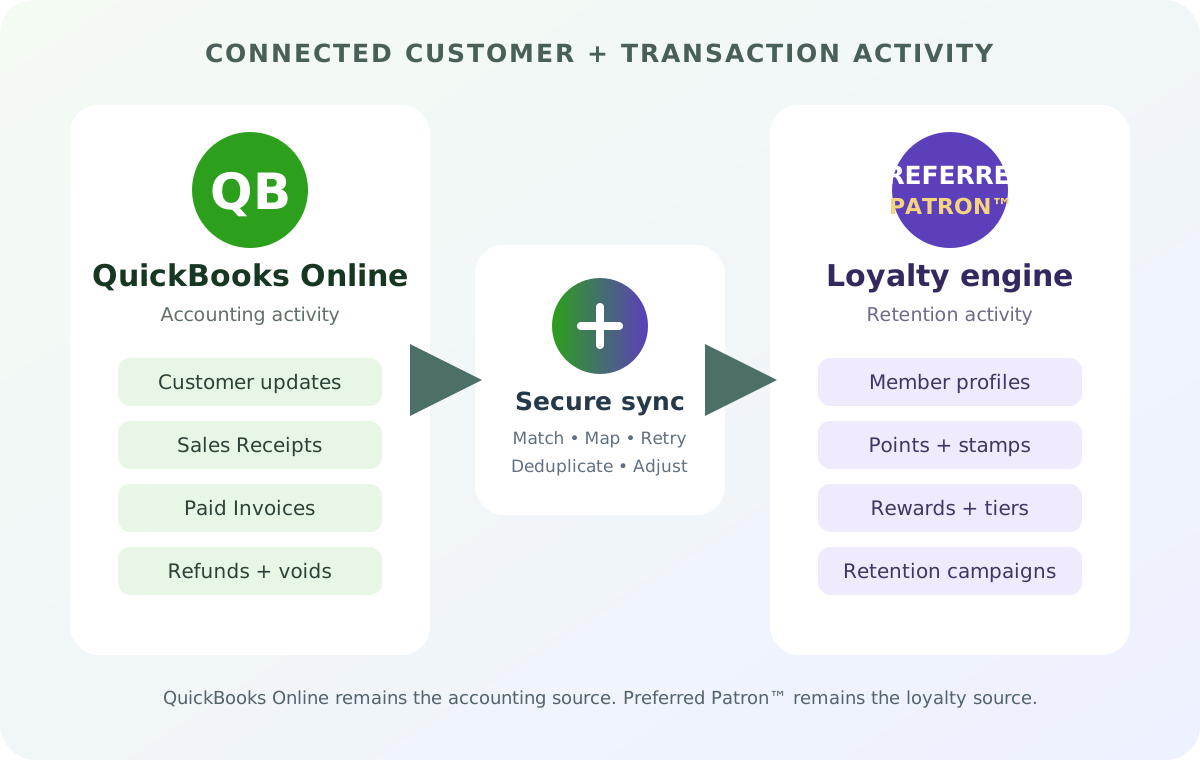
CURRENT INTEGRATION DATA MAP
What connects between QuickBooks Online and Preferred Patron?
The integration focuses on the information needed to identify the customer, recognize eligible activity and keep later accounting adjustments aligned with loyalty.
| QuickBooks activity | Integration behavior | Loyalty purpose |
|---|---|---|
| Customer create or update | QuickBooks to Preferred Patron | Match or maintain the customer identity used for loyalty activity. |
| Sales Receipt | Transaction processing | Post eligible completed sales without manual transaction entry. |
| Invoice and Payment | After payment completion | Recognize the transaction when the Invoice reaches the configured paid state. |
| Refund | Adjustment processing | Reflect qualifying refunded value against the original loyalty transaction. |
| Void | Reversal processing | Prevent voided accounting activity from remaining as valid loyalty activity. |
| Incremental changes | Scheduled synchronization | Discover relevant changes without repeatedly importing the entire company file. |
Clear division of responsibility: QuickBooks Online manages accounting records. Preferred Patron™ manages loyalty balances, earning rules, rewards, redemptions and retention experiences.
HOW THE INTEGRATION WORKS
From QuickBooks transaction to loyalty activity
The design does more than push a one-time CSV. It maintains durable mappings, tracks transaction state and supports safe retry when a provider or network request is interrupted.
Activity occurs
A supported customer or transaction change is recorded in QuickBooks Online.
The integration resolves identity
A durable mapping connects the Preferred Patron member with the corresponding QuickBooks Online customer.
Loyalty is updated
The connection reads current QuickBooks state and submits the eligible sale or adjustment to Preferred Patron™.
Processing is tracked
Stable identifiers, processing versions and status tracking guard against duplicate posting while supporting retries.
PRACTICAL QUICKBOOKS ONLINE USE CASES
Turn accounting activity into loyalty outcomes
Supported QuickBooks Online activity becomes an input to Preferred Patron™, where it can drive the configured loyalty and retention experience.
Recognize completed sales
Use supported completed Sales Receipts to post eligible loyalty activity without separate transaction entry.
Wait for payment completion
Recognize configured Invoice activity after payment instead of treating an open receivable as a completed loyalty sale.
Keep adjustments aligned
Relate supported refunded value back to the original loyalty transaction.
Reverse invalid activity
Prevent a voided accounting transaction from continuing to count as valid loyalty activity.
The important distinction: connected systems, not competing ledgers
QuickBooks Online remains responsible for accounting transactions. Preferred Patron™ remains responsible for calculating points, interpreting visits, determining rewards and operating the loyalty program.
WHY ADD A LOYALTY PLATFORM AT ALL?
Preferred Patron brings the customer-value layer that sits underneath the campaign.
Marketing automation can decide when to communicate. A loyalty platform must also know what a member earned, what they can redeem, how a visit qualifies, which tier they are in, whether stored value exists and what experience should happen at the business itself.
That is the customer-retention role Preferred Patron™ adds alongside QuickBooks Online.
BUILT FOR A DURABLE BUSINESS INTEGRATION
More than a field mapper
The integration is designed for long-running synchronization, not just a one-time contact import.
Encrypted credentials
The business authorizes the connection through QuickBooks Online. Access and refresh tokens are protected and used server-side.
Signed webhook validation
Inbound QuickBooks Online webhook requests are signature-validated before they are accepted for durable processing.
Reconciliation and retries
Scheduled reconciliation and durable checkpoints provide a recovery path when webhook delivery, provider calls or network requests are interrupted.
Duplicate protection
Stable QuickBooks transaction references and processing versions prevent a retry from becoming a second loyalty sale.
For custom development and broader integration requirements, see the Preferred Patron REST API integration page.
QUICKBOOKS ONLINE INTEGRATION FAQ
Questions businesses ask before connecting accounting and loyalty
Does Preferred Patron replace QuickBooks Online?
No. QuickBooks Online remains your accounting platform. Preferred Patron™ adds the loyalty layer: points, rewards, tiers, digital stamp cards, gift cards, member experiences, Apple and Google Wallet, communications and retention automation.
Which QuickBooks transactions are supported?
The current integration is designed around Sales Receipts and paid Invoices, with corresponding handling for qualifying refunds and voids. Final behavior depends on merchant configuration and available transaction detail.
Will an unpaid Invoice earn loyalty credit?
The Invoice flow is designed to wait for payment completion before posting the qualifying sale to Preferred Patron, preventing an open Invoice from being treated as completed revenue.
What happens when a sale is refunded or voided?
The integration tracks the relationship to the original QuickBooks transaction so supported refunds or voids can be reflected as loyalty adjustments.
How are duplicate transactions prevented?
QuickBooks company and transaction identifiers create stable references, while processing versions and status are tracked. This makes retries safe and helps prevent the same provider transaction from being posted repeatedly.
Does the business need to export and upload files?
No routine CSV workflow is intended. Once authorized and configured, the connection processes supported QuickBooks activity through the integration.
Is QuickBooks Desktop supported by this integration?
This page describes the QuickBooks Online integration. QuickBooks Desktop uses a different connection model and should be reviewed separately.
Can an existing Preferred Patron client add QuickBooks Online?
Yes. Existing Preferred Patron™ clients can connect a supported QuickBooks Online company and configure the customer and transaction flows appropriate for their loyalty program.
Do we need custom code just to connect the two systems?
No custom development is normally required for the supported integration. The business authorizes its QuickBooks Online company and Preferred Patron configures the applicable customer and transaction flow.
MAKE EVERY ELIGIBLE SALE WORK HARDER
Already using QuickBooks Online? Loyalty can fit the workflow you have.
Show us how your business records customers, Sales Receipts and Invoices. We will review where Preferred Patron™ can add points, rewards, gift cards and automated retention with less manual work.
BOOK A FREE QUICKBOOKS ONLINE + LOYALTY REVIEW